
Klaviyo Sunset Flow: Clean Your List Without Losing Revenue
A Klaviyo sunset flow is an automated email sequence that targets inactive subscribers who have shown zero engagement, giving them one final chance to re-engage before being suppressed from your list entirely. According to Klaviyo's official documentation, the flow triggers when a profile enters a segment of users with no opens, clicks, site activity, product views, cart starts, or purchases on record. The practical result: your sender reputation improves, your deliverability metrics recover, and your billing reflects only the subscribers who actually matter to your revenue.
Most ecommerce brands ignore this until something breaks. Open rates start sliding, inbox placement gets shaky, and suddenly campaigns that used to perform are landing in spam. A well-configured sunset flow fixes that systematically. This guide covers every step.
What Is a Klaviyo Sunset Flow and Why Does It Matter?
A Klaviyo sunset flow is a short automated sequence sent to unengaged subscribers as a last-ditch re-engagement attempt before suppression removes them from your active list. It sits at the end of the subscriber lifecycle, after win-back efforts have already run their course.
The deliverability case for running one is direct. Gmail now significantly penalises sender reputation when emails go to subscribers who have not engaged in six months, according to Attentive's email deliverability research. That penalisation is not theoretical. It shows up as lower inbox placement rates across your entire sending domain, not just to those inactive profiles.

And yet, despite knowing this, most senders do nothing. Sinch Mailgun's State of Email Deliverability report found that approximately 39% of senders were rarely or never conducting list hygiene. That is four in ten brands actively dragging their own performance down.

The sunset flow is not about deleting people. It is about making a clear, intentional decision: either this subscriber re-engages, or they leave the list. Both outcomes benefit you. Suppression is not failure. It is list health in action.
For ecommerce and D2C brands on Klaviyo, there is a secondary benefit worth flagging. Klaviyo bills based on active profile count. Suppressing unengaged subscribers reduces your billable contacts. Done properly, a sunset flow pays for itself through lower monthly costs alone, before you even account for the deliverability gains.
When Should You Sunset Subscribers?
Subscribers who have not interacted with your emails in 3 to 6 months should be flagged for follow-up, according to Mail Monitor's list hygiene best practices. That is the window where disengagement becomes a deliverability liability rather than a temporary dip.
The most common threshold we see working across ecommerce accounts is 180 days of zero engagement. Some brands use 90 days for a more aggressive approach, particularly if they send at high frequency. The right number depends on your send cadence. If you email twice a week, 90 days of silence is a strong signal. If you send once a month, extend that to 180 days before triggering the sunset flow.
One important nuance: Apple Mail Privacy Protection has made open-based engagement tracking unreliable for iOS users. A profile showing opens may not have actually opened anything. This is why click-based engagement and purchase behaviour carry more weight when defining your sunset segment criteria.
For most Klaviyo accounts, the practical sunset criteria looks like this:
- No email opens in the past 180 days (adjusted for Apple MPP where possible)
- No email clicks in the past 180 days
- No site activity or product views in the past 180 days
- No purchases in the past 180 days
- Subscribed to email marketing
- Not already suppressed
Build your sunset segment around these conditions and you will catch the genuinely disengaged profiles without sweeping up people who bought recently but never clicked an email.
How to Create a Sunset Segment in Klaviyo
The sunset segment in Klaviyo defines who enters your sunset flow, and getting the criteria right determines whether the flow cleans your list effectively or removes people who still have commercial value.
Start by navigating to the Segments tab in your Klaviyo account. Select 'Create Segment' and name it clearly, something like 'Sunset Flow - Unengaged 180 Days'. Precise naming matters because this segment will also drive your suppression process later.
Core Segment Conditions
Set the following conditions, connected with AND logic:
- Properties about someone: Email is not empty
- What someone has done: Opened Email zero times in the past 180 days
- What someone has done: Clicked Email zero times in the past 180 days
- What someone has done: Placed Order zero times in the past 180 days
- Properties about someone: Email Marketing Consent is subscribed
Add a suppression exclusion condition to keep already-suppressed profiles out: Properties about someone, Email Consent, is not suppressed.
Optional Refinements
If your brand has significant iOS traffic, consider replacing the opens condition with a clicks-only condition. Open data from Apple Mail Privacy Protection is artificially inflated, so a profile showing opens without any clicks is likely a false positive.
You can also add a 'Joined List' condition to exclude profiles who subscribed within the past 90 days. New subscribers should never enter a sunset flow before they have had a fair chance to engage with your welcome sequence.
Save the segment and give Klaviyo a few minutes to populate it. The count you see is the size of your deliverability problem. Most accounts we review find this number much larger than expected. That is not a reason to panic. It is exactly why the sunset flow exists.
How to Set Up a Sunset Flow in Klaviyo (Step-by-Step)
Setting up a Klaviyo sunset flow takes under an hour if you have your sunset segment ready, and Klaviyo's Flows Library includes a pre-built sunset template to accelerate the process.
Step 1: Access the Pre-Built Sunset Flow Template
In your Klaviyo account, go to Flows and select 'Create Flow'. Choose 'Browse Ideas' or search for 'sunset' in the Flows Library. Klaviyo's pre-built 'Sunset Unengaged Subscribers' template appears here. Select it. This gives you a working flow structure with placeholder emails, time delays, and a conditional split already configured. You will customise it, but starting from the template saves meaningful setup time.
Step 2: Configure the Flow Trigger
Set the flow trigger to 'Segment' and select your sunset segment from the previous section. When a profile joins that segment, they enter the flow. This is the core mechanic: the segment does the qualification work, the flow handles the sequence.
Under the trigger, set the flow filter to exclude profiles who have opened or clicked an email since the flow started. This stops someone who re-engages midway through the sequence from continuing to receive sunset emails. Add these flow filters:
- Opened Email: zero times since starting this flow
- Clicked Email: zero times since starting this flow
These flow filters are the safety net. Without them, a subscriber who clicks on email one will still receive emails two and three, which wastes sends and creates a poor experience.
Step 3: Build the Email Sequence
A sunset flow works best with two to five emails, spaced several days apart. Three emails is a solid default for most ecommerce brands. Sequence the flow like this:
- Email 1 (Day 0): Soft re-engagement check-in. Acknowledge the absence without blame. Ask if they still want to hear from you.
- Email 2 (Day 5-7): Offer something of value. A discount, early access, or exclusive content gives them a concrete reason to re-engage.
- Email 3 (Day 10-14): Final notice. Be explicit that they will be removed from the list if they do not take action. Include an easy unsubscribe option alongside the re-engagement CTA.
Step 4: Add the Update Profile Property Action
After the final email, add a time delay of two to three days, then insert an 'Update Profile Property' action. Set the property name to Unengaged and the value to True (or Yes if you prefer a string value rather than boolean). This profile property flag is what powers your suppression process in the next stage.
A note on boolean vs string values: Klaviyo handles both, but using a consistent format across your account matters. If you use boolean True in the update property action, filter your suppression segment using boolean conditions, not string conditions. Mixing them creates a mismatch where profiles get flagged but never suppressed.
Step 5: Add a Conditional Split for Engagers
Before the Update Profile Property action, insert a conditional split. The condition is: has opened or clicked any email in this flow. Profiles who answer yes on the split exit the flow without being flagged as unengaged. They have re-engaged. Route them back into your normal sending segments or into a reactivated subscriber segment for monitoring over the next one to two months.
Profiles who answer no continue through to the Update Profile Property step and receive the Unengaged = True flag. That flag is what the suppression segment picks up next.
Step 6: Back-Populate Past Profiles
By default, new Klaviyo flows only trigger for profiles who enter the trigger segment after the flow goes live. To process profiles who were already in your sunset segment before you built the flow, use the 'Add Historical Profiles' option in the flow settings. Klaviyo will back-populate those profiles into the sequence. Run this once after the flow is live and tested. Do not run it repeatedly, or you will send duplicate sequences to the same people.
For a broader look at how this flow fits within your retention architecture, the complete guide to Klaviyo flows for ecommerce covers where sunset fits relative to every other automated sequence in your account.
Sunset Flow vs Win-Back Flow: What Is the Difference?
A sunset flow and a win-back flow target overlapping audiences but serve fundamentally different purposes, and confusing the two is one of the most common structural mistakes we see in Klaviyo accounts.
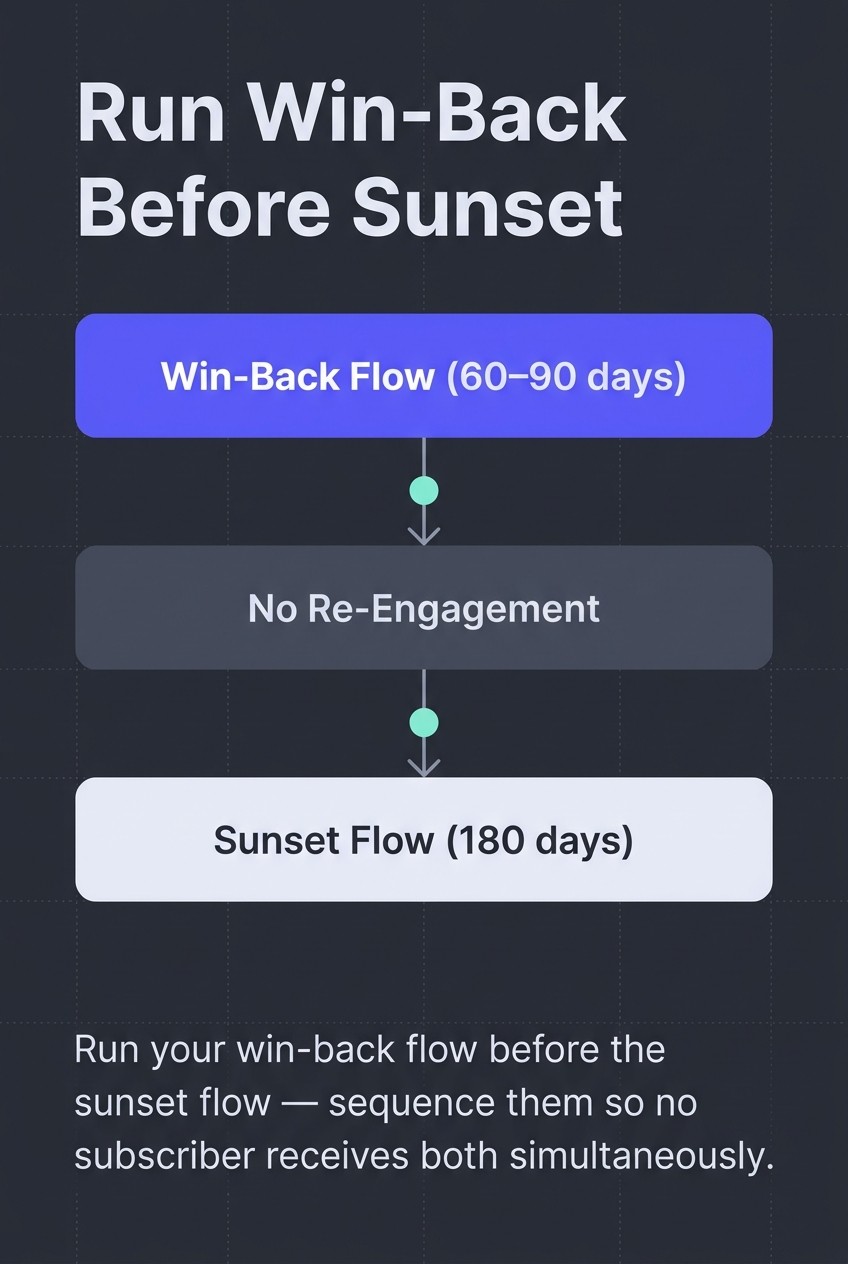
The win-back flow is an earlier intervention. It targets subscribers who were previously engaged but have gone quiet, typically after 60 to 90 days of inactivity. The goal is re-engagement before disengagement becomes permanent. Win-back emails often include incentives, personalised product recommendations, and messaging that references the subscriber's past behaviour. The tone is warmer, the intent is commercial, and success is measured by purchases or re-engagement clicks.
The sunset flow comes after win-back has either run or been bypassed. It targets the more deeply inactive profiles, those at 180 days of zero engagement, who have likely already passed through a win-back sequence without responding. The sunset flow's goal is binary: either the subscriber re-engages now, or they are suppressed. There is no middle ground, and there should not be.
Run them in sequence, not in parallel. A subscriber should complete your win-back flow before entering your sunset segment. Build this as a flow filter or segment exclusion condition to prevent the same profile from receiving both sequences simultaneously. Overlap here confuses subscribers and dilutes the urgency that makes sunset emails work.
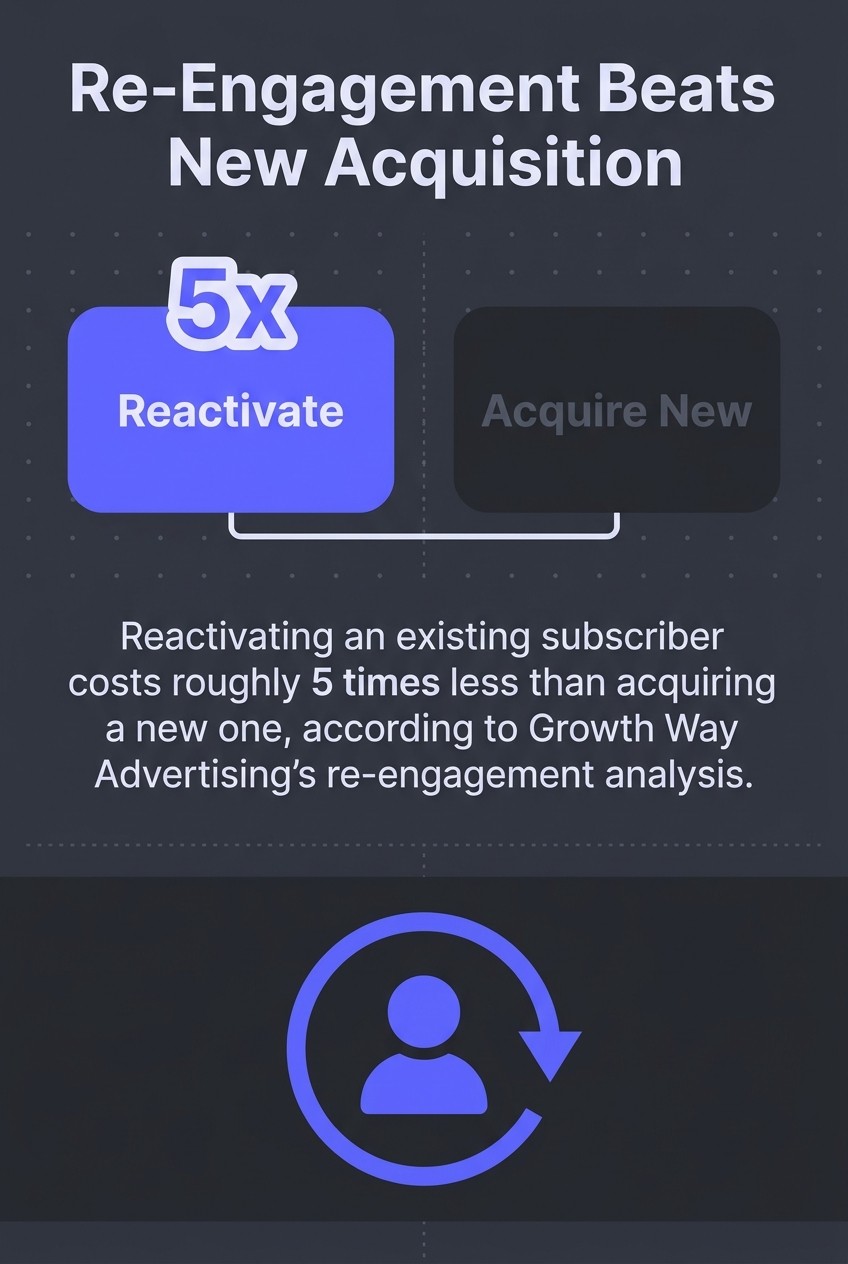
Reactivating an existing subscriber costs roughly 5 times less than acquiring a new one, according to Growth Way Advertising's re-engagement analysis. That is the commercial argument for running both flows properly, in order, before accepting suppression as the outcome.
Sunset Flow Email Best Practices
The emails inside your Klaviyo sunset flow carry more weight than most brands realise. They are often the last communication a subscriber receives from your brand before suppression. Done well, they recover a meaningful slice of lapsed subscribers and protect your sender reputation in the process.
Format and Tone
Plain text or near-plain-text emails consistently outperform heavily designed templates in re-engagement sequences. The reasoning is practical: a personal-looking email from a real person reads differently to a promotional blast, and that difference in perception drives higher engagement rates among the very subscribers who have been tuning out your branded campaigns.
Keep the copy short. Two to four sentences per email is enough. Every word should either ask a direct question, offer a specific reason to stay, or clearly communicate what happens if they do not respond.
Subject Line Approaches That Work
Subject lines for sunset flow emails should create mild urgency without manufactured panic. The most effective approaches tend to be direct and slightly personal:
- 'Are you still there?' or 'Is this still the right inbox for you?'
- 'We are about to remove you from our list'
- 'One click to stay on our list'
- '[First name], your spot on our list is expiring'
- 'Last email before we say goodbye'
Avoid subject lines that feel like a retention gimmick. 'We miss you' is overused. 'Exclusive offer inside' sends the wrong signal for a list-cleaning email and inflates your re-engagement numbers with coupon-hunters rather than genuinely reactivated subscribers.
Personalisation and CTA
Use the subscriber's first name where you have it. Include two clear options in each email: a re-engagement CTA (click here to confirm you want to stay subscribed) and an easy unsubscribe link. Giving both options upfront reduces spam complaints. Subscribers who want to leave will leave cleanly, rather than marking your email as junk because they cannot find the unsubscribe button.
The re-engagement CTA click is what triggers the conditional split in your sunset flow. When a subscriber clicks it, they exit the unengaged path. That click updates their engagement data in Klaviyo and prevents the Unengaged profile property from being applied.
How to Suppress Unengaged Profiles After the Flow
Suppression in Klaviyo removes a profile from all future sending while preserving their historical data, and the sunset flow's Update Profile Property step creates the flag that makes bulk suppression straightforward.
Creating the Suppression Segment
Build a new segment with this condition: Properties about someone, Unengaged, equals True. This segment populates automatically as profiles complete the sunset flow without re-engaging. It is the suppression queue.
Check that the profile property value format matches what you set in the Update Profile Property action. If you used boolean True in the flow, use boolean True in the segment filter. String vs boolean mismatches are the single most common reason suppression segments fail to populate correctly.
Running the Bulk Suppress Action
Navigate to your suppression segment. Select all profiles and choose the 'Suppress' option from the bulk action menu. Klaviyo marks these profiles as suppressed, removing them from all future flow triggers and campaign sends. They remain in your account with their full history intact, but they no longer count towards active email sends or trigger any automation.
Run this suppression action on a regular cadence, monthly is practical for most accounts. New profiles will complete the sunset flow and accumulate in the segment between runs. Letting it build for longer than a month means you are still sending to flagged-but-not-yet-suppressed profiles in the interim.
Klaviyo Billing Impact
Suppressed profiles do not count towards your Klaviyo billable contact limit. For accounts with large inactive subscriber populations, the reduction in contact count after running suppression can be substantial enough to drop you into a lower billing tier. Run the suppression process after your first full sunset flow cycle completes, check your active profile count, and review whether your plan tier still matches your actual list size.
For a full audit of your Klaviyo account's list health and flow structure, our Klaviyo audit checklist walks through every area worth reviewing, including suppression gaps that are quietly costing you on deliverability and billing.
Key Metrics to Track for Your Sunset Flow
A Klaviyo sunset flow performs its job when your deliverability improves and your active list shrinks to only genuine subscribers. The metrics that tell you whether it is working cover both the flow itself and the broader account health it is designed to protect.
Flow-Level Metrics
Track these within the sunset flow's analytics in Klaviyo:
- Re-engagement rate: the percentage of profiles who opened or clicked within the flow sequence. This is your recovery rate. Even a 5% re-engagement rate on a large inactive segment represents meaningful list recovery.
- Unsubscribe rate per email: higher unsubscribes on email three versus email one is normal and expected. A very high unsubscribe rate on email one suggests the criteria are too aggressive or the segment is catching recently active subscribers.
- Suppression rate: the percentage of entrants who reach the Unengaged = True flag without re-engaging. This is the primary output of the flow. Track it by cohort to monitor list decay over time.
Account-Level Deliverability Metrics
The real proof of a working sunset flow shows up at the account level, not just in the flow's own stats. Klaviyo's 2026 benchmarks show that automated flows deliver 5.58% click rates versus 1.69% for campaigns. That gap widens when your active list is clean. After suppression runs, you should see:

- Rising open and click rates across all campaigns and flows
- Improved inbox placement rates (if you use an inbox testing tool)
- Reduced spam complaint rates
- Stable or lower bounce rates
Monitor these for one to two months post-suppression. Deliverability recovery is not instant. Mailbox providers update sender reputation scores on a rolling basis, so improvements appear gradually rather than overnight.
If you want to track re-entry behaviour for reactivated subscribers, the detail on Klaviyo re-entry criteria and how it affects automation strategy is worth reading alongside this guide. Re-entry rules determine whether a reactivated profile can cycle back through other flows, and getting them wrong undoes some of the cleanup work the sunset flow delivers.
Frequently Asked Questions
How many emails should a sunset flow include?
Two to five emails is the standard range. Three works well for most ecommerce brands: a soft check-in, a value offer, and a clear final notice. Fewer than two does not give genuinely interested subscribers enough chances to re-engage. More than five starts to feel like harassment rather than re-engagement.
What is the difference between suppress and unsubscribe in Klaviyo?
Unsubscribed profiles have opted out themselves and cannot be re-subscribed without explicit consent. Suppressed profiles have been removed by you as the sender. They retain their historical data and can, in theory, re-subscribe through a sign-up form. For sunset flow purposes, suppression is the correct action because it preserves the profile record whilst stopping all future sends.
Will suppressing profiles hurt my revenue?
Not if your sunset segment criteria are correctly set. Profiles with 180 days of zero engagement and zero purchases are not generating revenue. They are generating deliverability risk. Suppressing them cleans the list without removing any commercially active subscribers.
Should I run the sunset flow before or after win-back?
After. The win-back flow handles early-stage disengagement at 60 to 90 days. The sunset flow handles deeper inactivity at 180 days and beyond. Run them in sequence by building win-back flow completion as an exclusion condition in your sunset segment criteria.
How often should I run the suppression action?
Monthly is practical for most accounts. Build the suppression segment and process it on the same day each month. Quarterly works for smaller lists where the volume of completed sunset flow profiles is low.
Make List Health Inevitable
A Klaviyo sunset flow is not optional maintenance. It is the mechanism that keeps your sender reputation intact and your deliverability consistent across every other flow and campaign you run. The brands we see struggling with inbox placement almost always share one trait: they have never systematically suppressed inactive subscribers.
Set up the sunset segment, configure the flow, run the conditional split, apply the Unengaged profile property, and suppress on a monthly cadence. That process, running in the background, protects the performance of everything else in your Klaviyo account.
If you want to see how the sunset flow fits within a complete ecommerce retention strategy, our customer retention Klaviyo playbook covers the full lifecycle from acquisition through to lapse recovery. Start there if you want the broader picture. Or start with the sunset flow today. Either way, make retention inevitable.
.jpg)
.jpg)